

Montessori Roots: Checklist
An IOS app for parents bringing Montessori home- designed, built, and shipped end-to-end as a non-coder using Claude Code
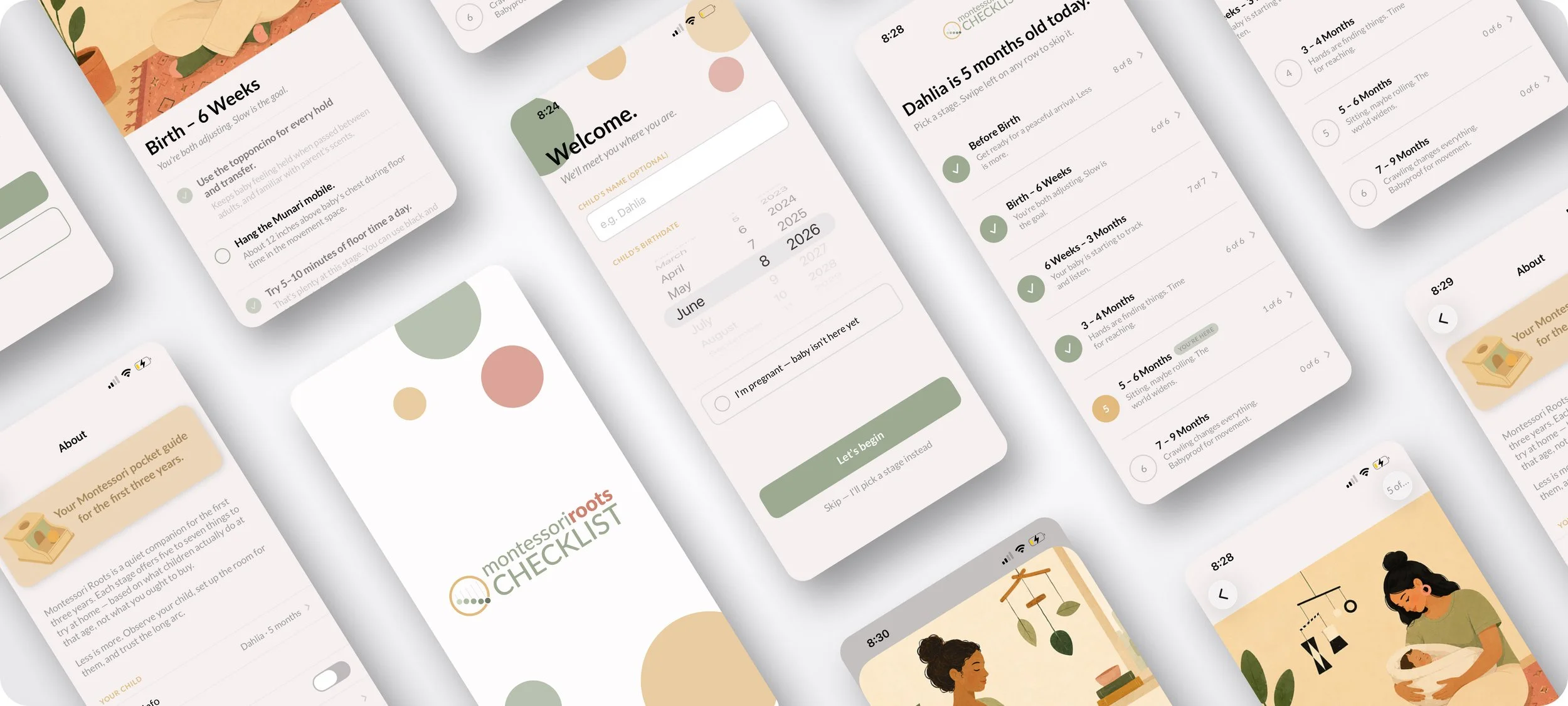
Background
Authentic Montessori guidance for the first three years is genuinely hard to find publicly. Most of what parents encounter online calls itself "Montessori" but isn't grounded in the actual pedagogy — Pinterest activity ideas, "Montessori-inspired" toys, aesthetic room setups that miss the underlying philosophy entirely. The real content — activity manuals, credential program materials, teacher-training handbooks — lives inside closed programs that most parents will never access.
I wanted to change that. As an AMS Infant/Toddler credentialed Montessori practitioner, I had access to the pedagogy. As a designer, I had the visual and product thinking. What I didn't have was engineering. So I decided to test whether a designer could ship a real iOS app end-to-end using AI as the technical execution partner — and whether the result would meet App Store quality standards.
Six weeks later, the answer was yes. Montessori Roots: Checklist is live in the App Store.
My role
Solo designer, developer, and product owner. I handled brand identity, illustration direction, UX/UI design, content curation, technical execution via Claude Code, App Store submission, marketing site design, and launch strategy.
Tools
Figma, Adobe Illustrator, Xcode, Claude Code, App Store Connect
Objectives
The Why
How might a designer without an engineering background ship a production-quality iOS app, and what does that mean for how design work gets made in the age of AI?
The problem was two-fold. First, parents genuinely lacked accessible, credible Montessori 0-3 content. Second, I wanted to test a new mode of working: designer-led, AI-executed. Job listings for product designers increasingly ask for AI fluency, and specifically for experience with tools like Claude Code, Cursor, and similar. I wanted to build something real to prove I could operate in that mode — not a prototype, not a demo, but a shipped product with real users, real reviews, and real accountability to Apple's review process.
Montessori Roots: Checklist was designed to solve two problems at once: give parents authentic Montessori guidance for the first three years, and demonstrate that designers can now ship production software end-to-end when paired with AI tools.
This project was structured to lean into that shift, not resist it. I did the work I know best (research, design, product decisions, brand, voice, taste, quality control) and used Claude Code to translate designs into working SwiftUI. The AI didn't decide what to build. I did. It executed how — and I reviewed, refined, and directed at every step.
Design first, code second.
The role of the designer is shifting - from craftsperson handing off to engineering, to end-to-end product owner directing AI execution.
Design process
Visualizing Solutions
Content and pedagogy
The starting point wasn't wireframes, it was content. I curated 86 Montessori activities across 11 developmental stages, from pregnancy through age 3, drawing from AMI standards, my own AMS Infant/Toddler credential program materials, and additional AMI Assistants to Infancy materials shared by a friend. Every activity was chosen for one criterion: could a new parent actually do this at home, without a Montessori backgrounds.
Brand identity
The brand system had to feel calm, warm, and pedagogically credible without being clinical. I built a full identity from scratch.
From Figma to Xcode
I designed every screen in Figma - welcome flow, stage picker, checklist views, celebration moments, settings, edge cases. Then, working screen by screen, I directed Claude Code to build the SwiftUI implementation. My role was to specify behavior, review the output, catch bugs, request adjustments, and make the product-level decisions that AI cannot make on its own.
Final Design
Deliverables
Onboarding & Stage Picker
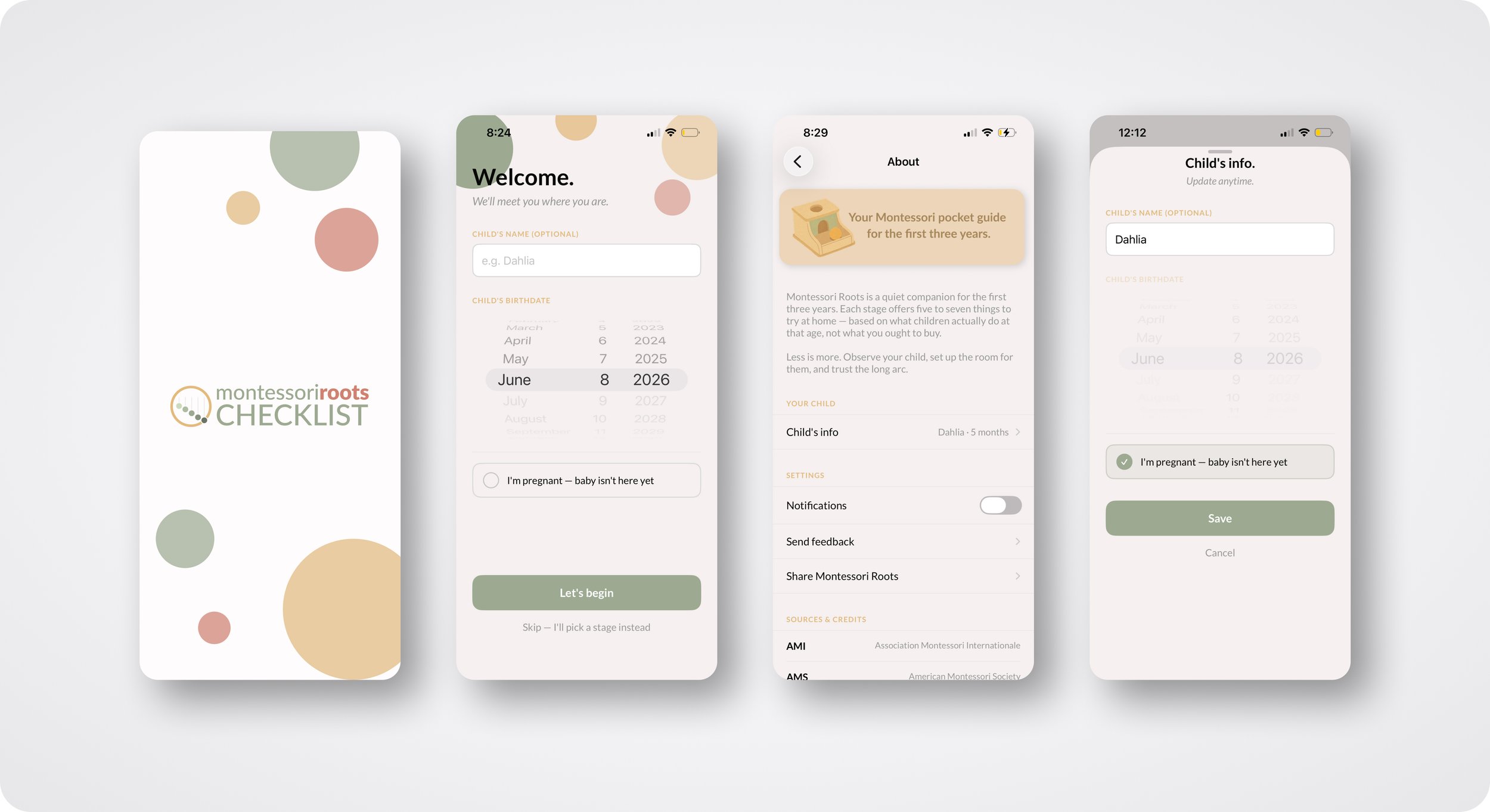
A calm three-path onboarding: parents can enter their child's name and birthdate to get personalized stage recommendations, mark that they're pregnant to start at the beginning, or skip and pick a stage manually. The Stage Picker gives parents the full arc of the first three years in one scrollable view.
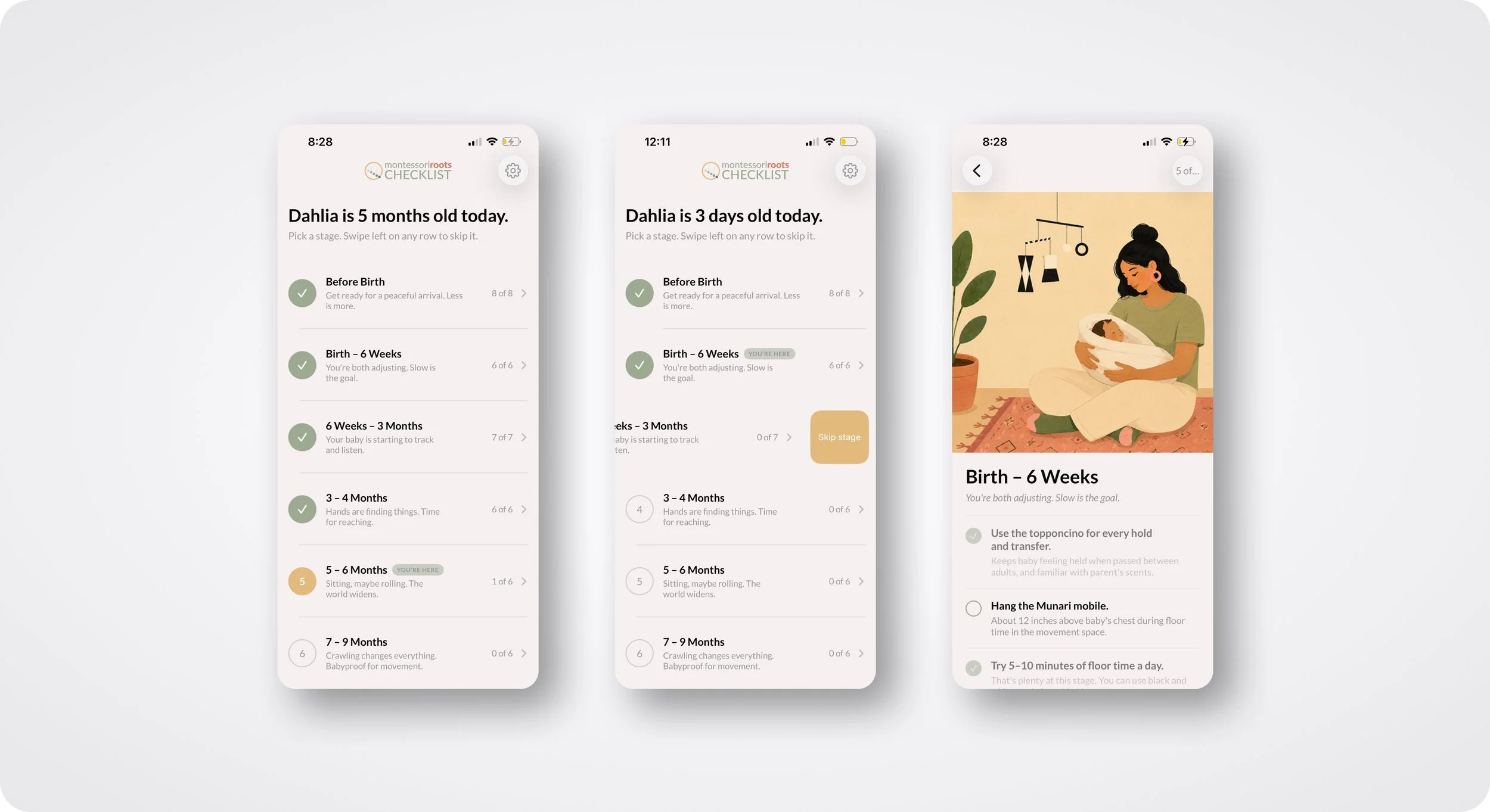
Each stage's activities live under a painterly hero illustration that anchors the emotional tone. Activities are simple, actionable, and briefly described, no overwhelming detail, no toy shopping lists. Progress is tracked locally with no accounts required. Swipe-to-skip lets parents move past stages that don't fit their child.
The Checklist
Celebration Moments
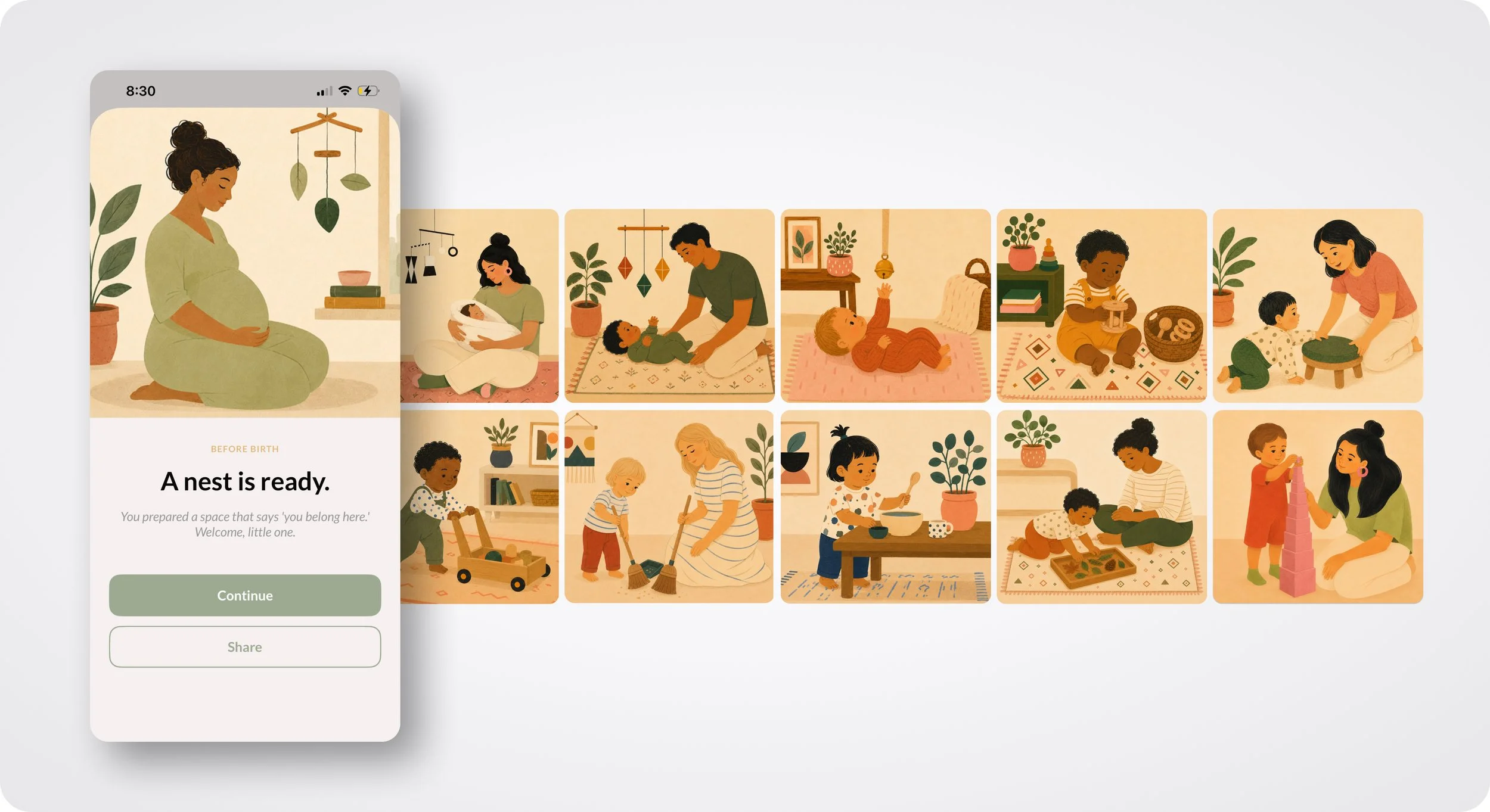
At the end of each completed stage, a full-screen celebration sheet appears, a quiet moment of recognition rather than a gamified reward. The celebration image can be shared to Instagram, Messages, or anywhere else, extending the emotional weight of the moment beyond the app itself.
App Store presence
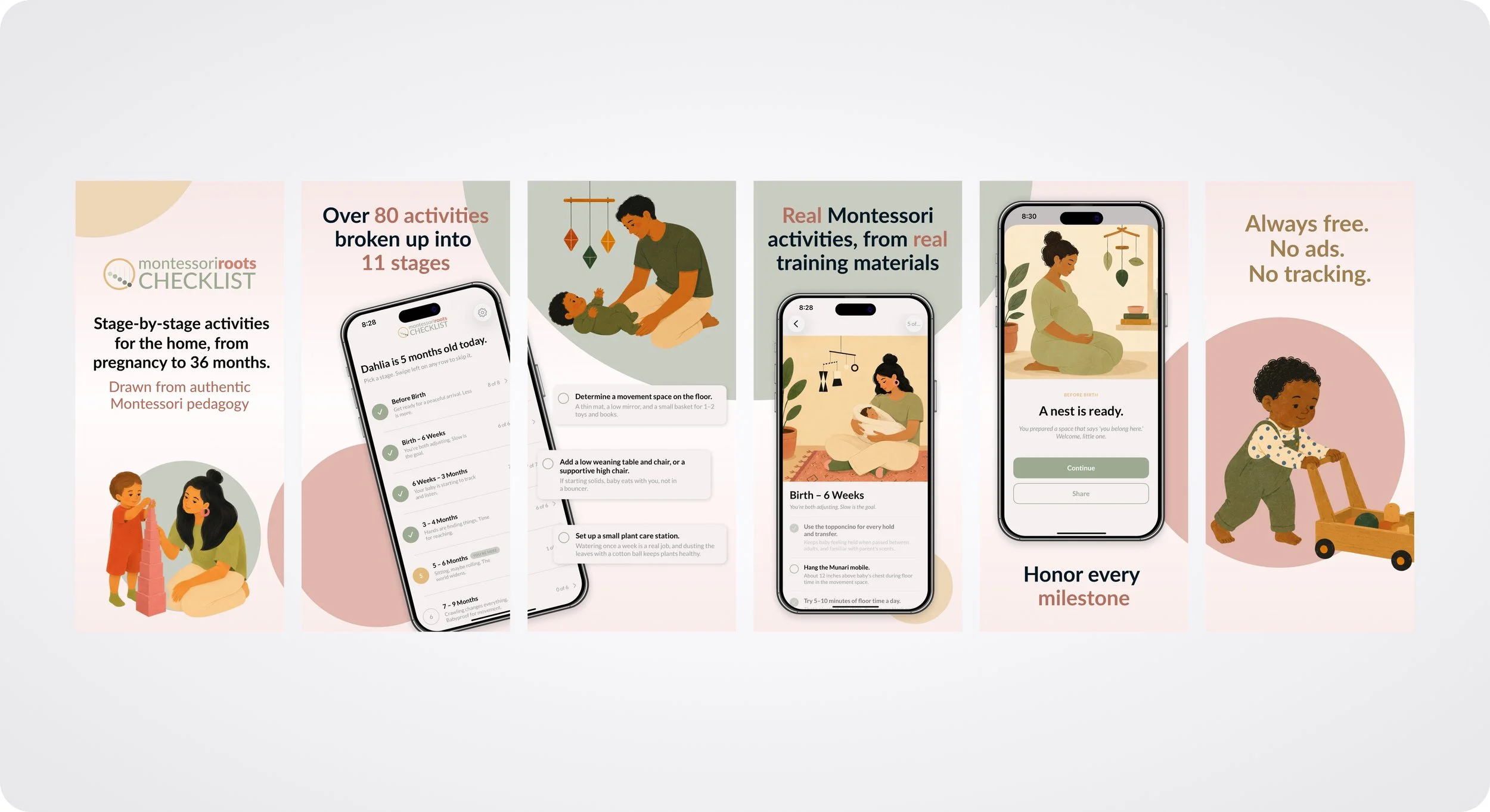
I designed 7 App Store screenshots at 1290×2796 (6.7" iPhone), each communicating a different aspect of the product: the brand, the content structure, the personalization, the emotional moments, the trust signals (free, no ads, no tracking), and the credentialed practitioner behind it. The listing copy, keywords, subtitle, and promotional text were all written in the app's brand voice.
Final Thoughts
Building With AI
What working with Claude Code actually looked like.
The workflow was iterative and conversational. I'd describe what I wanted a screen or feature to do — usually with a Figma reference — and Claude Code would generate Swift/SwiftUI code, propose file structures, and flag ambiguities. I'd review, test in Xcode Simulator, catch issues, and direct refinements. When I hit design decisions the AI shouldn't make (naming, tone, information hierarchy, UX flow), I made them. When I hit technical execution the AI could handle better (implementing UIActivityViewController correctly, managing SwiftUI view state, handling notification permissions), I delegated.
The mental model that worked best: I was the product designer and product owner. Claude Code was a fast, tireless senior engineer who needed direction. The output quality was directly tied to how clearly I could specify what I wanted. Bad prompts = bad code. Clear intent + design references + testing = production-ready output.
The Apple review process
The app was rejected on first submission under Guideline 1.4.1 - Apple's medical/health content policy required an explicit disclaimer and clear citations for the pedagogical claims. I revised the App Store description to include the disclaimer, added a Sources & Disclaimer section to the landing page, updated the in-app About with tappable AMI and AMS citations, and added a dedicated Sources link in the Settings menu. Apple approved the revised version within 48 hours.
The rejection was a useful reminder: shipping a health-adjacent product means designing for reviewers as well as users. The disclaimer and citation architecture became part of the product, not a legal afterthought.
Final Thoughts
This project was, more than anything, an experiment in what a designer can now ship on their own. The answer surprised me: much more than I expected — but only when the design work upstream is disciplined, opinionated, and clear. AI accelerates execution; it doesn't replace judgment.
I learned how to plan an iOS build in Xcode, how to think about App Store metadata as a design surface, how to navigate Apple's review process, how to structure a Swift/SwiftUI codebase, and how to direct AI tools to produce production-quality output. I also learned where AI tools break down — subjective decisions, brand voice, edge cases in user experience, and moments where the "right" answer isn't obvious from context.
The bigger takeaway: designer roles are expanding. The teams that used to require a designer plus two engineers to ship an MVP can increasingly be handled by a designer plus AI tooling. That's a real shift in what designers can own, propose, and prototype at production quality — and it's exactly the shift I wanted to demonstrate with this project.
Montessori Roots: Checklist is live in the App Store. The larger flagship Montessori Roots app is in development.